I’m sure there are many programs out there these days (free and for $) that will convert files to the iPod format. Well, here is one. It’s called 3GP Converter. It converts typical computer movies to the 3GP video wrapper. That means you can convert to many different formats, but we are only concerned with the iPod MP4 format.
1. DOWNLOAD and UNZIP
Download 3GP Converter and unzip the folder. No install is necessary. It might be a good idea to unzip it to a folder in Program Files (e.g. C:\Program Files\3GP Converter\).
2. RUN INITIAL SETUP
After everything is unzipped, run Setup.exe which will set the basic preferences for the converter. You only need to run this setup the first time you use it.
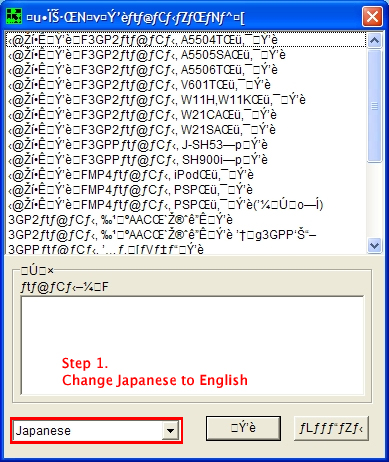
You may notice the only thing you can understand is the word Japansese at the bottom left. Click it and select English to change the language to English.
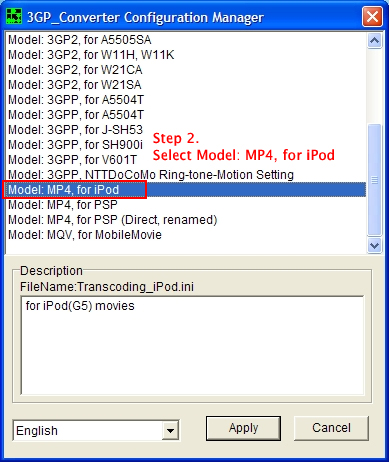
Now that you can actually read the formats, scroll down and select Model: MP4, for iPod. This is the format we will convert to. As you can see, there are a ton of other formats to convert to, so do what you want…if you have a PSP or a phone that supports these formats.
3. CONVERT
Click the apply button on the Setup panel. From now on, you just need to run the 3GP_Converter.exe program.
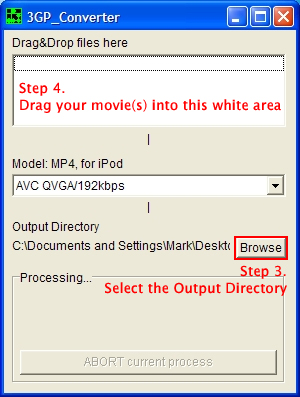
Select an output directory by clicking Browse. You can also choose some other options using the drop-down menu, but I’ve only tried the default. Feel free to try different bit rates and whatnot and comment on your success/failure in the comments. Now, to convert a movie, just drag it onto the white area at the top. If you drag multiple movies up there, they will queue up for conversions.
It works, I can put my video into the itune and then ipod.
Please tell me how to change the ratio of movie recorded in wide screen 16/9 to fit ipod screen.
This converter does not sync sound properly.
i have the same problem with this….there is no video to watch and thes a sound problem….
Thanks for the feedback.
In my experience, it’s worked fine. Maybe it depends on the type of file (and quality) that you’re converting.
Mark: What type of files wouldn’t convert properly (if any)? Are there other programs out there like this that do the job just as well?
hh
how do i get the files onto the convertor?
Jess,
As quoted from the last paragraph:
naaahhhh! its not working….
3gp converter it works for me 100% if the file is avi,mpg etc
but y tried to convert ny dvds movies (vts files )
its not working or tell me steps to follow thank you
The converter only converts basic avi, mpeg files. It won’t convert a DVD to an iPod-ready file. You need other special software for that. That in itself is probably two steps: converting a DVD to an avi, then converting that avi to a smaller iPod-ready movie.
Mine stands in 0%
Ummm does this converter convert 3gp to mp4? because it just says processing and it wont work thanks
I got the 3gp converter to open fine, and i was able to convert my videos and the audio worked fine with it as well. however, none of my videos saved to my ipod when i tried updating it, even though it says they’re in the correct format. Why isnt it working?
works amazingly — great program !! Chears Mike
Yes I had problems with sound/video syncing. Audio was about a second behind the video. For the record, I used a bitrate of 768kbps. I’ll have to try a different setting another time. All other programs I’ve tried haven’t even gotten this far so I don’t mind trying again!
I’ve just got an ipod for christmas and have used other programs to convert video. All of the other program’s made the sound go out of sync when converting to MP4. This is a very good program for the speed at which it converts though, it does make the sound go out of sync with the video with the video’s i’ve tried. Good article though thanks
Ben
It won’t convert DVD to MP4?
That in itself is probably two steps: converting a DVD to an avi, then converting that avi to a smaller iPod-ready movie.
How can I convert DVD to avi? Where can I get a program to do this?
try http://www.videohelp.com
Here is a great program for converting DVD’s to ipod format
http://www.sr88.co.uk/handbrake.php
hi there, got the 3gp set up ok, but it doesnt seem to be converting all the files to i tunes…keeps coming up with the error ” an error has occured during the process (error 1 )?? any help would be great
can anyone tell me why go to the movies folder on the ipod, how do i transfer the music videos to the music videos folder and the movies to the movies folder?
This converter worked GREAT for me!! All of the movies I downloaded and then converted played perfectly on my ipod. It was a little slow converting, but once I got them onto my ipod and watched them, it was well worth the wait!! Thanks so much!!
Where do your converted files go after conversion?
To the output directory selected in the program. It’s right there in the main interface.
Great program, one thing though, how can i convert my mpeg files into the format that my LG Fusic phone has…it runs 3gpp2 files. I’ve tried all the different settings and when i try to open the file i have converted i get “invalid file” or my phone restarts on its own when i open the file…please help.
thanx
-checocinero
worked like a dream,thanks
for me, all it did was download, and now its stuck processing, its been processing for an hour now….
i’m confused, i’ve got nothing, i put in everything & got to the end of the steps, but where are you supposed to drag movies from? what’s going on, no one else seemes to have had this problem. i’m getting so sick of apple & ipods, they’re boring me to death & cant seem to get anything to work, i’m taking mine back tomorrow but i’ve got a whole evening & boredness, so i might as well have a go at this. anyway, anyone able to help?
Installed great, and got through the set up… but I put a movie in to the Drop Area and It went through the conversion but it did not bring up Itunes or have a complete conversion… there was nothing in my document area… What am i doing Wrong??
Mitch this is a stand alone program from Itunes.
This is what I do.
1.Drag your avi file into the blank box on 3GP.
2.Select what directory you want to send the conversion to by selecting the brows button(in 3GP)
3. Open Itunes and drag the converted avi into the movie folder (Your library)
4.Connect your iPod and sync your movies (I do it manually)
5. Watch it on your pod!
Hello porn on the go!
i convertfine to MPEG 4 but when i go to to my itunes library its there
when i update it to my ipod it plays music of the video and has a thum
bnail of the video
It didnt work at first for me. But then I figured it out. Just go to movies after it decoded or reformated your Video. THen just add the file to your movies and it just works!
THANKS ALOT
i tried to drap a movie into it, but then it pops up a window saying error: 2048…how do i fix it?
I didn’t write the program, I’m just recommending it. A simple Google search yields some possible resolutions.
videos that you download from limewire do those transfer properly or do they get screwed up
omg thank you so much i was having sucha hard time with the ipod works 100% i f****** love u
I cannot drag and drop! I pressed browse. Found file I want to drag and drop. But it will not physically drag nor drop! I have been trying to figure this out for hours! Pleases tell me what I’m doing wrong.
worked for me, thanks!
WELL IT SUCCESSFULLY DOWNLOADED AND CONVERTED BUT FOR SOME REASON I CANT FIND THE FILE TO PLACE IN MY ITUNES…WHERE DO I FIND IT
How do I put it into the white box? Where do I put it in from? I tried from my computer. And were there people saying it wouldn’t format a DVD? Because that’s what I needed. Please help me.
after it finishs proccesing, do you just drag to itunes?
Thanks this 100% works for me now i can watch southpark during my band class 🙂 oh yeah if you can get a movie on to the 3GP_converter try making a copy of the file put in a doucment and then drag and drop it form there oh yea the maker of this is a fucking geniues
I’m confused how do i convert dvds to my ipod
3gp downloaded w/ ease the same could not be said about conversion and yes the file was flawless! Icon appeared as mpeg4 however no audio or video was on file. I repeated this on two other avi’s just to be sure( I don’t like spitting out bad reviews if it is the fault of the operator)and spent hours for conversions that did not work. It sounds as if many are confused and if you are new to this perhaps you should try videora supersimple for the newbs.
Where do i go to get the files to drag and drop? im so confused!
how do you drag and drop stuff?? its not working!!
kay i figured out how to drag and drop the videos, but after i drop it, it just disappears..its so weird..what am i doing wrong? and what do i do once it is there? how do i convert it?
how do i know when it is finished?
Brittany,
Drop files into the white area below the words “Drag & Drop files here.”
J3TT,
It will disappear from the window when it’s done.
convrter to i pod
where do i get the movies from?
I can’t just put the movie into my computer drive….can I?
yo why is there no video got avi file. I hear the sound on the ipod but no video
I have followed all the steps, but when i drag a large VOB movie file into the drop and drag box it it just dissapears, and when i have looked in the log it says the conversion is finished, but the file is not where the output directory is set to. Also there is no way that a file of this size could be converted so quickly. Any Ideas?does anyone know what i am doing wrong?
RC,
You need to use AVIs or MPEGs — and formats similar. Raw VOB files won’t work to my knowledge. 🙁
Doods, how do you unzip something. i dont know how to unzip i dont really get this stuff
joey,
Download WinZip or 7-Zip to unzip a file.
i’m downloading right now.. i hope this supports videos to not just movies?
yo man i downloaded it and dragged a movie and it disspered and it syas prccessing fo rlike past 10 min plz help..plz.
I drag my videos where it says to put them…it says processing for like a split second then it says Error 1…..and i have no clue what i am doing wrong….please help….
I tried the converter and made a new folder, but each time it says it converted, there is nothing in the folder… what did I do wrong? Help?
i can’t convert file after it is added to itunes
if it converts,there is no media
hey, it downloaded on to my computer great, but it won’t convert any of my movies. i followed to insrtictions exactly as they said so i don’t know what went wrong.
how much time it takes to convert a 100 minutes movie (AVI format) to iPOD (mp4) format.?
When I drag the movie file over to drag and drop it tells me error 1. What is error 1?
I got the DvD onto my system with DVD Decrypter. I just selected “Edit->Main Movie Files and then Decrypt. I made a folder and selected that as my destination. Once the movie finished, about 10-15 minutes, I used VOB Merge 2.5 to merge the files. Again naming the file “the title of the movie”, and leaving it in the same folder as before. It took about another 10-15 min to merge. After merging I checked the movie on my PC to see if it worked, and it did. Sound and video were good but I could not use any rewind/forward or menu options, play, stop and pause were the only options. If I stopped it and started over it would start from the beginning. Now I tried using the 3GP_Converter but the movie is immediately removed from the “Drag/Drop” screen and doesn not Convert. I get a “T>Cannot load avisynth.dll” message in the log. Anyhow, everything else worked and I am stuck there. Thanks and I hope my info helps.
I don’t get how to move it to itunes. I got it from limewire so I just dragged it there. What folder do I go back too??
I dont know how to move it to itunes once its done
Thank you sooooo much dawg! I appreciate it!
I like watching tv shows but people want to charge me money for something I could see for free on tv. Thanks
Katey
The place where you drag your file into (Step 4), just drag it back where you got it from (even though you can’t see it, it’s there).
Ignore that last comment I made.
ok, well I am having some trouble putting videos from my videos into the converter. I have TONS of videos, but they just don’t show up on the list. help me Please!!!!!!!!!!!
When I try to do it it gives an error and says “Cannot load avisynth.dll” What’s that?
Man, y’all are a bunch of dense, thick headed type people, this is the easiest conversion tool on the planet. Get it in gear, peeps.
How Do You Unzip The File???
To unzip a file, download 7-Zip or WinZip.
oooow 🙁 … i run this soft on linux… i need to drag and drop files but it dont work… is it other way to add files to process? … thx for help 😉
what about Divx movies? i have several Divx films that won’t open in Quicktime. any suggestions for a codec? i’ve tried several that won’t work.
I have an issue, i chose the output directory as my desktop, and i drag and drop my video file…and it doesn’t appear even after an hour of waiting. How long does the conversion usually take?
never mind i’m an idiot….i got it to work =)
I have a problem… When I convert my movie (.avi) it makes it out of sync with the audio. I have tried different convertors, but it is always like that. Could anyone please help? I really want that movie on my iPod. 🙁 It make it out of sync for like 3 seconds…
Wait. SO lets say u download a video type that is mp4 on LimeWire, does it mean it needs no conversion and can be placed on your ipod directly?
i converted my movie and that worked but when i go on itunes and try to add it to my library nothin is in the file i put as the output directory?? some one help me
What is Output directory? Is it where your file is going to go after its done converting? And one more thing, is it me ore i just cant watch avi. downloads on Winamp or something.
MAN!!! Everything is working properly but when the file is done converting, its in the set output without any change and cant be placed in my ipod. Can some1 please clearly explain how to do this?
Man theres like no results after i convert avi files and when i watch them on Winamp, i can only hear the sound. No visual. Whats wrong, what am i doin wrong?
jean says:
i convertfine to MPEG 4 but when i go to to my itunes library its there
when i update it to my ipod it plays music of the video and has a thum
bnail of the video
February 16th, 2007 [ 12:22am ]
i’m getting just the thumbnails with sound also…..anybody know how to fix this?
Any knows how to put movies or videos in a LG fusic phone?????
Hi, will this program convert ipod video files to any other format. I don’t have an ipod but have been trying to find a converter so I can watch video podcasts on my pda. Just thought I’d ask before I download.
I have been converting VOB files with no problem for some time.
The only thing I did first was to use DVD Shrink to select only the
movie portion of the DVD and in the options set the output file so it
isn’t broken into several smaller files. Once this one large file is created
I just drag it into 3GP.
every tme i press browes and chose my movie it tell me canot write to root directory what can i do?
i downloaded a movie that took 2 days and it wont lemme play it on my ipod or any program. this file is so isolated. theres no way to get into it. ive never seen anything like this. this 3gp looked like itd work but i got an error-2048. help me out here!
OMG, thanx so much for providing such a program. I never knew something like this would actually exist!
hey i thought id say thanks im alreadying doing it and its quite easy acually
thanks for the article was really helpful
xx
How do you drag & drop that is the last thing I need to do. HELP!!!!!
wen i drag and drop it processes 100 percent then says an error occured during the processing [error 2095]. help me wat is this and how do i fix it.
o yea and every tme i press browes and chose my movie it tell me canot write to root directory
Noobs… my God. Google.com for 90% of your dumb ass questions please. How do I drag and drop? Geesh… we ALL have to learn, but do some work on your own instead of filling up a comment page with dumb a$$ drivel.
I cannot drog and drop the files..when i tried to drag the file into the white box it says processing but after 2-3 seconds it would disappear..i cant seem to covert the file..The files are in mpeg format..pls do help me, im getting sick with this ipod..
hey all
while converting even i m getting the following error.please help
Cannot load avisynth.dll
Thanks so much i have downloaded about 10 programs and they didint work. Great program.
Awesome program! Encoded my mpeg file in about 5 minutes and plays flawlessly in iTunes.
yeah guys this program defnately isnt good just find so other program….go on google and type how to put movies on an ipod….then clik on the second link…as long as it isnt this one…that should help u out….that 2nd one actually does work so enjoy…
will this program convert MVI-####thm movies to itunes.
I’ve tried other programs before and they did not work well with the sound. This program is perfect! Sound and everything is in sync!! -Thanks!
This program is great! It’s quick and easy and works perfectly. Within 5 minutes i was watching videos on my ipod. Thanks alot.
Does anyone know how I can use 3GP to convert .avi files that are in anamorphic widescreen? Other than that, this program works very well and is extremely easy to use.
followed the steps on the website and read quite a few comments on this page but still no answer to why it hangs up in the processing stage why does it take so long and how long should i expect it to take? its been processing the first movie for an hour is this normal? and why isn’t there a progress bar allowing me to see the how far along the process is?
Now how do i get it on ipod?
i just downloaded and used the converter and it was fine. converted an avi file that i made through premier pro no problems…
thanks very much!!!!!
This works great for mpegs And avis but not dvd vid but thats fine its been working better than anything else that I’ve tried…. Thnx
It worked amazingly!!!! Thanks!
yeah, i dont know if i was just lazy, but the movie i used on this came out in a different language
Yeah!!! I’ve bought alot of software online so that I can convert my VOB files to iPod and my .avi files to PSP, but this one works great, no problem whatsoever, and it was free. Thanks a million.
Hey your software sucks dong i tried using it multiple time to convert mpeg and avi files and it never works i uninstalled and reinstalled and still same error it always freezes gosh any help would be greatly appreciated
Cheers Jefro,
Hey i dunno what that last guys problem was but this program is the best that a 100 out of 10 me wuv u long time…. i back these guys 250% all the way keep up the great work guys peace out my niggas
God damn, thank you so much it worked like a fucking charm!!! I dont know if I can say fucking but I just did… Thank you so much…
hi all, i have tried several programs and it worked honestly it can convert movies with high quality but there is a common problem i guess wich is the picture and the sound the sound is like seconds faster than the picture or maybe the opposite and its a problem with many programs not just this i dunno why if u can come up with something notify me please and thanks for listening
hey guys try these programs i think it will work better than this one (AoA Mp4 Converter) & this one (4ump4 video converter) i got those 2 progrmas and their cracks if u just need them u can add me on your msn and i can send them to you my e-mail address is yehia_001@hotmail.com u should try them u will lose nothing
hi how to put movies to my ipods
I download videos from Veoh and for every video I download, there are two files saved in my Veoh folder: 1 FLV file and 1 ENC file. I try dragging the FLV file into the 3GP converter but it always says Error 1… Help…
hi mark i have a question how come when its done downloadin it says finished in the log but when i go to the directory to find the file its not there ????
How do you drag the movies into the box??
The frame/size/time are chaning, but stays at 0%, shall i just wait or what? Im converting a Heroes episode, .avi
Please help me Mark! =)
Now even tried with a Qlimax oncert, .avi … doesnt work…
Yay, i tried with a 8 sec .avi, and it worked, tho i hope it will work with londer clips. I guess you just have to wait…
Working now =), thanks a lot mark
Please people, read the freakin page and comments to their entirety before you post. People just end up asking questions over and over.
Well i did read, but no one helped the other poster who mentioned the same thing as me, it seemed to work for every single one, but mine stayed at 0%, but it works anyway, just wait =)
Mark, what happens to the converted file if you forgot to put in an output?
where does the file go when it has been processed?
Does anyone at all know?
The file goes to the path you chose in Step 3. Please see the screenshot above to see where that it.
Great applications just ripped some family movies from my digital camera and a dvd rip that was done with DVD Fab so I now have Finding Nemo on my ipod nano – great programme and no sound picture sync issues
THIS PROGRAMME IS TOTALLY AWESOME,TY SO MUCH…IT’S QUICK & TOTALLY IN SINC……..TY AGAIN
but marc, how are you supposed to drag it into itunes because that part doesnt work for me?
how come when you try dragging the movies into itunes it wont sync onto my ipod or into my library?
when its finished converting, it automatically puts it into itunes,all you have 2 do is sync yr ipod,simple as that guys
OKAY THIS MESSAGE IS TO HELP OUT ALL LIMEWIRE to IPOD QUESTIONERS!!!!!!!! you dont even NEED a converter to transfer limewire downloads to your ipod. I went through the same troubles i have an ipod too! All you have to do is double click to get the program to download, wait till it 100% fully downloads, right click the program, click explore (All of your limewire downloads will appear in this folder), then once you find your download in the folder right click it and click OPEN WITH ITUNES. It will appear right in your library, ready to go!!!! A lot of the times it will even start playing automatically!! I hope this helps……..
how do i turn on my computer, what is a drag and drop, you people are fucking retarded!!!!!!!!!!!!!!!!
it didn’t work out very well…………i couldn’t change it and i can’t even close it now!!!!!!!!!!!!
marvelous!
thanks a bunch!
works perfectly!!!!!!!!! thanks bunches : )
use avs video convertor i use and i can convert straight from dvd or anything into m4v files for my ipod nano its great the free version works well you just get a water mark pop up every few mins but it is only small i liked it so much i paid the 29 us$ for the licence
great program but does not work wiv new dvd’s
how do you put dvds onto the 3gp_converter
in order to put a frigging film into my ipod i have to convert myself into a tech nerd is this really necessary !
works fine but for some reason only does 3.18 minutes of the first movie I gave it..ideas?..tricks?
help!!!!!!
were can I download this program ?
I would thank you if anyone can reply to my question as soon as posible
Click the link under step 1.
Thanks for answering my question
I used the program but it didn’t work
it only got to 0porcent witch it was very upsetting
so any help is apreccieted
Directed too all having issues:
Unfortunately, I’m just suggesting this program as a way to convert files. I did not write it and therefore don’t know how to resolve any of the issues people are having. It’s also difficult to figure out the error codes because it was written by someone from Japan. Good luck with any issues you have, but if you do experience an error, all I can suggest it either to try again or find another converter. In my experience, this program works well, but I understand some file might just not work right.
For those who commented about how the program is stuck in processing:
When the program first starts, you’ll see the program display “processing,” it takes a while but the conversion will begin (when the bar begins to fill up). Once that’s done, the program will once again display processing.
But in actuality, it’s done with everything. All you have to do is go to your itunes and click on “Movies” under “Library” and the file should already be there.
Hope that helps.
wat if its a foreign movie, can u still convert it to put on the ipod?
can u convert dvd’s wid dis program??????????????????
this program use to work with my video’s but know after converting the video’s they don’t show up any where and i dont know where to find them or if they are evenn working
Hi there,
I have a question. The converter won’t show any progress in the status bar. It stays at 0% (though the displays of frames, size and time do show movement). I’m converting a vid right now and it is taking forever (it is 185 MB big). Is that normal? I’m using the MPEG4 QGVA/768kbps setting.
Can I somehow fasten things up a little bit?
Ok What does it mean when it asks for an OUT PUT directory. like MARK what do you usually put?
Click the Browse button and find a folder on your computer where you want the movie to be put into.
Nice guide, but this guide is fit for only Windows User. If you’re Mac user, you can use this free DVD Ripper for Mac, it can convert DVD to MP4 vidoe for iPod on Mac OS X, that’s awesome.
http://www.aimersoft.com/dvd-ripper-for-mac.html
its not working… its saying
Dialog: an error has occureed in the proscess
i dont get it… help?
i converted it but the video comes out upside down… can someone help pleaseeeee?!?1
Hi,
I’ve installed the convertor and goes to 100% converting file, but then brings error message saying that “QT3GPPFlatten.exe has encountered a problem and needs to close… Please tell Microsoft about this problem …” so on and need to click Send button. Seems to me that the converter is unable to open iTunes.
Also there is no file at the output folder.
Anyone had this problem?
Thanks,
RS
I dowloaded my movie and it finished 100% but then i dont no what to do next.
Advice?
Hey Very awesome program!!!! it works awesome!
So those of you that have said that your files dissapear once they have been dragged to the top of the box, i had that same problem. The solution is that you are not opening the program up correctly, you do have to open the setup, but then after you have unzipped it, you have to open the ioc that says 3PG Converter, which looks like its a program not a setup file, then when you open that it will ask you to set the language again and then open a similar window, but this will seem obvious that it is taking the time to actually convert the files. A bar will show up and it will go from 0 to 100% and then will be in the output file and be able to move to itunes!
Hope that helps guys!!!
Everything appears to be working correctly, but once its finished it get the damned – error during processing – any ideas
hi to everyone.
I think this converter is good, because it rely work in my pc.
Thank you very much. You are great….
Hey, everything works fine, but when i try to change harry potter and the order of the phoenix, it says “An error has occured (error 1)” any ideas of why its doing this or why everytime i try to do it only on that movie it stops and has an error?
I can’t seem to find my converted files. No errors occurred during conversion but I cant seem to find the converted files!
it worked for me, up until when it actually starts converting
both times i tried it got up to 2% and my computer froze
Thank you,
Worked great for avi to ipod.
Is it possible to encode 640×320 so that using ipod to output to tv?
i can’t find my converted files either!
Where Do I find the converter to download it?
FOR ANYONE NOT ABLE TO SYNC THEIR CONVERTED FILES TO IPOD
before downloadin this converter i read some of the comments bout how ppl cudnt sync it with their ipods. i didnt think it would happen to me but it did. when it said that some files could not be synced because this ipod couldnt play them a little exclamation mark (!) popped up beside it so i rightclicked on it and it come that it was unable to sync coz it cudnt find the original file n asked if i would like to locate it. so i clicked browse n i guess found the file for it.. havnt had a problem since.. hope it helps
sumhow it doesnt work on my computer
theres always sum window that says …core not found..blabla….kinda sucks
plz help me^^
o and it does say “processing” but theres always 0%…
im kinda confused^^
i understand you are supposed to drag the files into the white area but they are processing and tje output file just vanishes.. any ideas?anybody with a simular problem?
thanks alot
-jesus
I am having the same problems as you guys except, I am buying them off the itunes site and it still does not show up on my ipod.
Its converting the videos, as i type this, wmp, flv, mpeg, avi aso still the %bar is at all times in 0% mode though the software is actually converting the stuff it should convert, so im happ, that it works 🙂 Thank you.
How do you select the output directory??
Thanks
I was very pleased with this software. I had never fooled with my Ipod for movies or tried to convert avi to ipod and this converter and instructions were so easy and actually worked for me. Video and Audo came out perfect.
Thank you!
Great program, put the converted file into my itunes video section automatically so all I had to do was synch the ipod. Well done!!!
Thanks! Works great on avi (about 700mb, 2 hours) in about 40 minutes. No syncing problems on the two I tried.
A side note: for mac OSX (or PC or Linux really) Handbrake is great and super easy program to get from legally purchaced DVDs to any format. There’s several free OSX programs to take it from avi to mp4 too.
and for the Linux fellow, I don’t know about 3gp, but you might try ffmpeg, which is a great all around video program with lots of forums for support.
I can’t seem to drag movies into the white area.
It says error:
“Cannot write to a root directory”
what do i do now?
Where do you get the computer movies?
i just got the program its working fine…
i love it…
its so easy to use….
THANKS…..
dude..this program rocks.
it works for pretty much all my movies.
thanks very much!
and btw for those of you who want youtube videos onto your ipod, check out a program called itube!
cheers for the site mate!
Im not the best on computers but everyone it really is easy.follow the steps and you all be sweet….
If you dont know how to drag try copy and paste it
cheers
whats the optimum bit rate that you guys use?
ive followed all my steps,
got to step 4
and when i dragged my movies on to the white area, nothing showed up… PLEASE HELP
One problemo!! … I cant speak Japanese!!
What’s the ‘output directory’?
Help ASAP
Absolutely wonderful! Easy to follow instructions and it works like a charm, thanks so much, and Jillian, the ‘output directory’ is wherever you want the converted movie files to be saved, so only you can decide where to put those!
The instructions are great…brilliant concept here. Cheers.
Hey it stays on 0% for me…
it doesn’t work men!!! what should i do it dosn’t appear to my mp4.
why is it that every time im converting it in the middle its says something and when i put it in my ipod the writing in the middle is still there like not registered
It does not work….
Bah….didnt work for me either – gets to end of conversion and states there was an error, reports it then proceeds to say that its apple quicktimes fault.
When in doubt, point the finger 😉
It’s amazing how many people ask very stupid questions. hahaha idiots
This works fine for me, except there is a strange “blip” (or short beep) noise. Does anyone else get this?
For iPod users, Tipard iPod Converter Suite is an requisite iPod converter to rip DVD to iPod video and convert multi-format video to iPod video format on multifarious iPod devices. This iPod Converter Suite is a discount software. For the coming Christmas,the combination of iPod video converter, DVD to iPod Converter and iPod to computer Transfer is a nice gift for your friends and ralatives to enjoy their holiday.
http://www.tipard.com/ipod-converter-suite.html
FYI, all these free ipod video converters were failing for me as soon as I dragged the file to the window. After using this app with the included log file, I could see that it was because of my existing version of cygwin1.dll which was not compatible with this application. (OMG logging is so useful)
If you run Cygwin.dll for an application such as openssh or windows. Be sure to close the application prior to running this converter app and it will avoid the problem.
Well, i followed the instructuions and so far it’s going prettyy well.
I’m converting an XVID/AVI compressed videos and it worked fine! For some reason also, it imported it automaticly into my iTunes =S
Great program, shorter than waiting for a Torrent file to finish! Thanks!
I am downloading off limewire and when i follow the steps it keeps telling me an error has occured. Is there a way around this?
i bought the ipod touch how to convert movies to itune
my movies is RMVB files or mediaplayer
who can help me out thank u so much
I have been using Tipard DVD to iPod Converter.
It has fast conversion speed and high image/sound quality.
Share the guide about where to download and use it:
DVD to iPod Converter
http://www.squidoo.com/put-dvd-movies-on-ipod
How do you unzip it?
I cant drag and drop the file. What do i do?