HOWTO: Quickly Shut Down or Restart in Windows XP
[ 12 February 2007 ]
Marked under time savers, windows.

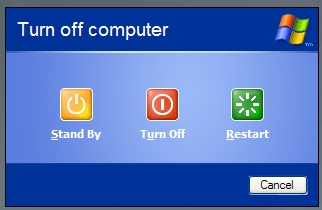
If you ever want to quickly Shut Down or Restart Windows XP, you can use Alt + F4 do get the job done. Alt + F4 is usually the “Exit” keyboard shortcut to exit the current program. However, if you’re on your Desktop, hitting Alt + F4 will actually prompt you to Stand By, Turn Off, or Restart your computer. Say, you have a program running and want to Restart, just hit the Windows Key + D (to go to the Desktop), then hit Alt + F4 to launch the prompt.
alt-f4.jpg


1 Comment on “HOWTO: Quickly Shut Down or Restart in Windows XP”


[...] All Things Marked: HOWTO – Quickly shut down or restart in Windows XP “If you ever want to quickly Shut Down or Restart Windows XP, you can use Alt + F4 do get the job done.” [...]

Speak your mind:

Allowed HTML: <a href="" title=""> <abbr title=""> <acronym title=""> <b> <blockquote cite=""> <cite> <code> <del datetime=""> <em> <i> <q cite=""> <strike> <strong>


Home


Article


Recent articles


Articles marked as


Search