HOWTO: Turn ClearType Font Rendering On
[ 26 February 2008 ]
Marked under windows.

ClearType font rendering in Windows adds a nice shadow to screen fonts. You may notice your desktop fonts have (or don’t have) this shadow:

No ClearType:
Without ClearType enabled

With ClearType:
With ClearType enabled

If you want to enable or disable it, go to Display Properties > Appearance.
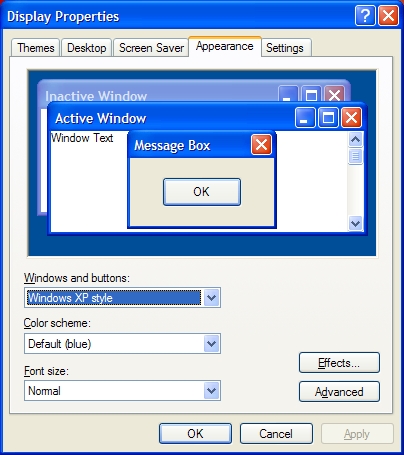
Appearance

Then click the Effects button and choose your option under the second drop-down menu.
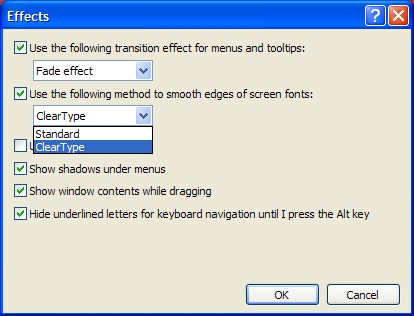
Effects


1 Comment on “HOWTO: Turn ClearType Font Rendering On”

John says:

I love the cleartype idea. However, I hate the shadow under the desktop icon letters and most cleartype fonts are awfull. Take for instance candara with it’s stupidly small numbers 0 to 9

Speak your mind:

Allowed HTML: <a href="" title=""> <abbr title=""> <acronym title=""> <b> <blockquote cite=""> <cite> <code> <del datetime=""> <em> <i> <q cite=""> <strike> <strong>


Home


Article


Recent articles


Articles marked as


Search


spam, email at: spamstudygonewild+atm@gmail.com